
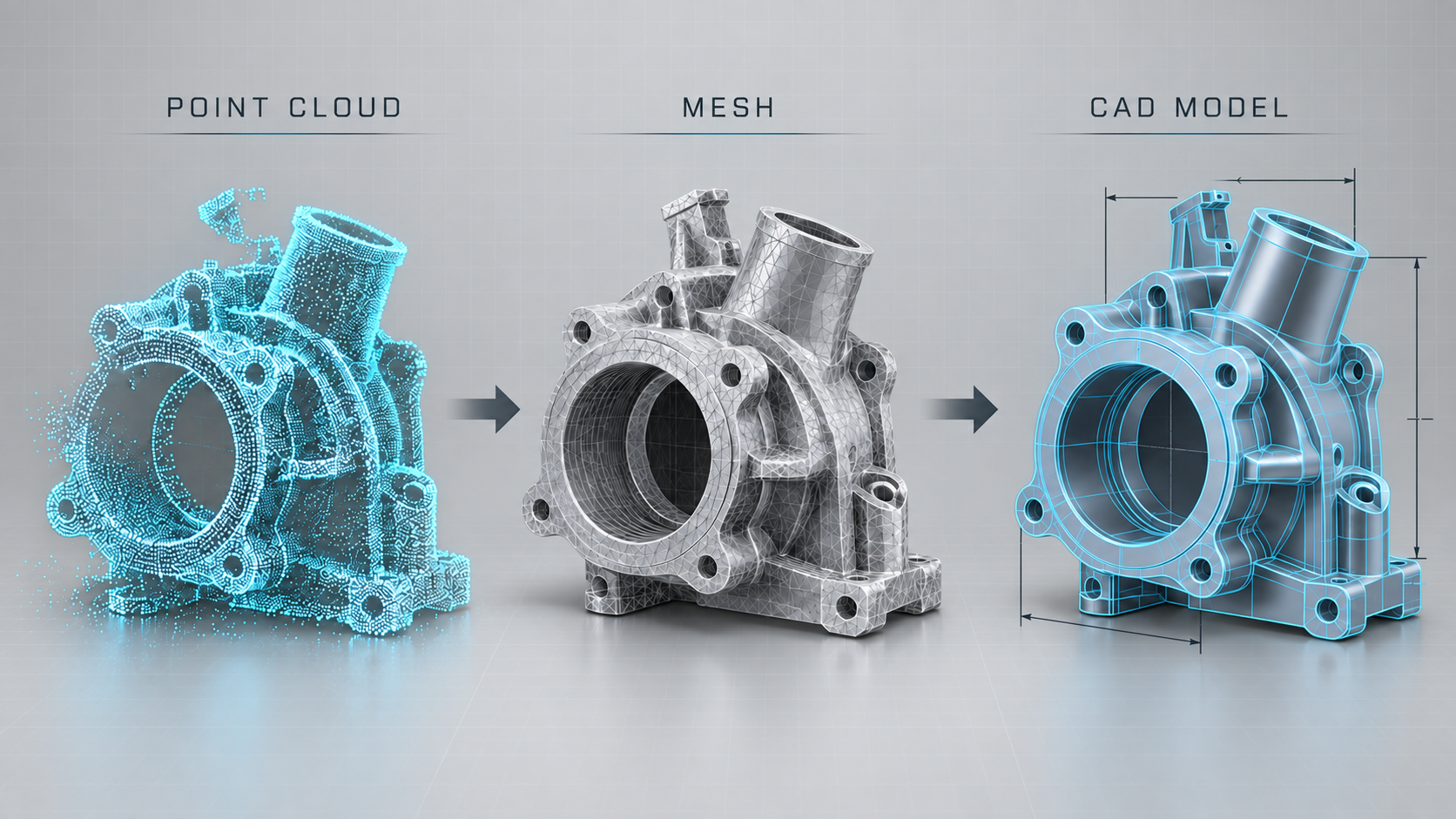
One of the first questions we get after a 3D scanning job is “what exactly will I receive?” The answer depends on what you plan to do with the data. 3D scanning file formats fall into three broad tiers: raw point clouds, polygon meshes such as STL and OBJ, and parametric CAD models such as STEP or SolidWorks files. Each tier represents a different amount of processing, a different level of usefulness, and a different price. This guide walks through what each format is, where it fits, and how to choose the right deliverable for your project so you are not paying for more than you need or receiving less than you can use.
Point clouds: the raw output of every 3D scan
Every 3D scanner, whether laser, structured light, or photogrammetry, starts by capturing millions of individual XYZ coordinates on the surface of the object. That collection of points is a point cloud. Common file types include PLY, XYZ, E57, PTS, and LAS, and many include color (RGB) values per point.
A point cloud is the most faithful record of what the scanner actually saw, but it is also the hardest to work with. There are no surfaces, only dots. You can measure between points, section it, and compare it against a CAD model, but you cannot 3D print it or machine from it directly. Point clouds are most useful for large-scale work such as building interiors, factory floors, and as-built documentation, where surveyors and architects bring the data into software like Autodesk ReCap or Revit. For product-sized parts, most of our customers never need the point cloud itself; it is an intermediate step on the way to a mesh.
Mesh files: STL, OBJ, and PLY for 3D printing and visualization
A mesh connects the points into a surface made of triangles. This is the format most people picture when they think of a “3D scan file.” STL is the industry default for 3D printing: it stores geometry only, no color, and every slicer and print service accepts it. OBJ (usually paired with an MTL and texture image) and PLY add color and texture, which matters for art reproduction, digital archives, game assets, and visual effects work.
Mesh output is what you want when the goal is to reproduce, display, or scale an object. It is ideal for replicating a sculpture, making a replacement for a discontinued housing that does not need engineering changes, or creating a digital twin for a website or AR viewer. Meshes are also what we send to our own printers when a customer wants a scan turned into a physical part, so the scan-to-print path is short.
The limitation is editability. A mesh is a frozen surface. You can smooth it, hollow it, or scale it, but you cannot easily change a hole diameter, add a boss, or tighten a tolerance because there are no features to edit, only triangles. Mesh file sizes also climb quickly; a detailed scan can run several hundred megabytes, so we typically decimate to a resolution appropriate for the end use.
What “watertight” means and why it matters
A printable mesh must be watertight, meaning it has no holes, flipped normals, or intersecting faces. Raw scans almost never are; undercuts, shiny areas, and the base of the object create gaps. Cleaning and closing those gaps is part of standard mesh processing, and it is one of the things that separates a usable STL from a raw scan dump.
CAD models: STEP, IGES, SolidWorks, and parametric files for engineering
The third tier is a true CAD model built from the scan data. Instead of triangles, the file contains geometric features: planes, cylinders, fillets, holes, and extrusions with real dimensions. Neutral formats include STEP and IGES; native formats include SolidWorks (SLDPRT), Fusion 360, Inventor, and Parasolid.
This is the deliverable for reverse engineering. If you need to modify the part, create manufacturing drawings, run a finite element analysis, machine it on a CNC, or design a mating component, you need CAD, not a mesh. Converting scan to CAD is a skilled manual process: a designer uses the mesh as a reference and rebuilds the geometry with design intent, deciding that a slightly warped scanned surface was meant to be a flat plane, or that a worn hole was originally a nominal 6.35 mm bore. The result is clean, editable, and usually more accurate to the original design than the worn part you handed us.
Because it takes engineering hours, scan-to-CAD costs more than mesh delivery. As a rough guide, mesh cleanup on a hand-sized part may add a modest fee to the scan itself, while a full parametric CAD rebuild often runs from several hundred to a few thousand dollars depending on complexity and the number of features. You can read more about the overall workflow on our 3D scanning service page.
Hybrid and inspection deliverables
Two other outputs come up often. A hybrid model uses CAD for prismatic features and keeps organic, freeform areas as NURBS surfaces fitted to the mesh, which is common for ergonomic grips and styled housings. An inspection report compares the scan against a nominal CAD model and produces a color deviation map plus dimensional callouts; the deliverable there is a PDF or a software-native report, not a geometry file.
How to choose the right 3D scanning file format
Ask what happens to the file after you receive it. If it goes to a 3D printer, ask for a cleaned, watertight STL (or OBJ if color matters). If it goes to an engineer or a machine shop, ask for STEP plus the native CAD format your team uses. If it goes to an architect or surveyor, ask for a registered point cloud in E57 or RCP. If it is for a website, game, or film, ask for a decimated OBJ or FBX with textures. When in doubt, request the mesh plus the point cloud; the mesh is immediately useful and the point cloud preserves the option to build CAD later without rescanning.
We deliver every format above from our Glendale shop and can advise before the scan starts so the file you get matches the job. If you have a part, product, or object that needs to be digitized, request a quote from eCadCam in Los Angeles and tell us where the file is headed; we will recommend the right deliverable and price it accordingly.